Draw with precision.
Use command entry, object snaps, layers, blocks, editable mounting plates and associative dimensions.
FORMA PRO · BY SPECIALISED
Build practical 2D design and draughting skills in a professional-style CAD workspace. From a first measured drawing to laser job preparation, Forma Pro brings precise geometry, familiar CAD commands and visual previews together. Try it in your browser without a login or installation.
This trial is not laser connected. Start, Pause and Stop simulate the preview only. Saving, exports and printing are disabled. Your work is temporary and is lost when you refresh or close the page.
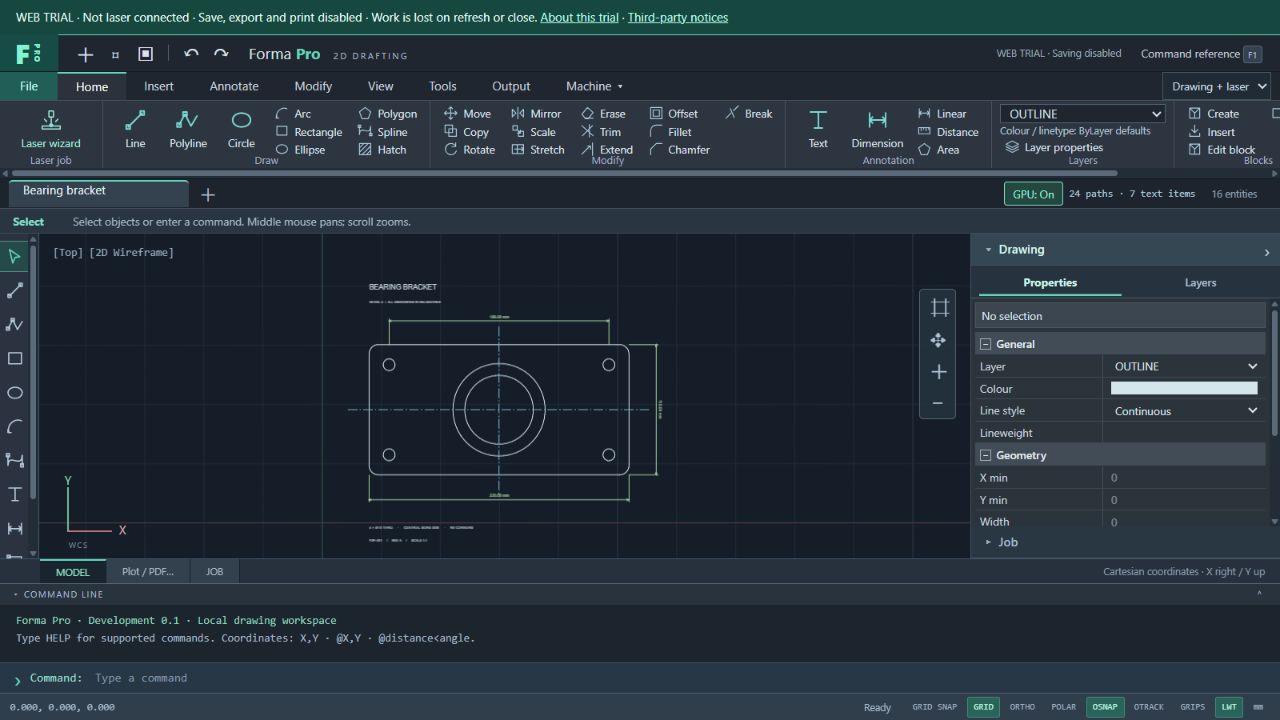
Use command entry, object snaps, layers, blocks, editable mounting plates and associative dimensions.
Try image tracing, STL depth maps, material settings, outline-based nesting and resizable stock previews.
Inspect processing order, travel moves and vector-job time estimates with simulated Start, Pause and Stop controls.
REAL-WORLD SKILLS. ROOM TO LEARN.
Introduce the conventions used in professional CAD: accurate coordinates, object snaps, organised layers, reusable blocks and dimensioned drawings. Forma Pro helps learners practise how a design is built, checked and prepared for manufacture.
Connect classroom design to practical projects. Students can develop a measured component, add dimensions, organise its geometry and explore cutting or engraving preparation in the same workspace.
Use a nameplate, mounting bracket or enclosure panel to discuss scale, fit, material size and the decisions behind a finished part.
Start with familiar shapes and visible drawing tools, then build confidence with coordinates, snaps and commands. A compact properties panel keeps geometry and drawing organisation close at hand.
Begin in Drawing only mode, then introduce laser preparation when the project calls for it.
Practise professional draughting workflows: draw accurately, reuse geometry, revise dimensions and review changes. These habits provide a useful foundation for further CAD study and workshop experience.
The browser trial offers a place to explore the tools before discussing a licensed setup for your classroom or workshop.
THE FORMA PRO TOOLKIT
Explore drawing, editing, image preparation and job planning in one workspace. Choose Drawing only for CAD work, or Drawing + laser to reveal the preparation tools.
The browser drawing and preparation tools are available without a feature paywall. Imports include Forma projects, DXF, SVG, PDF and supported images. DWG conversion requires a separate service and is not available in this hosted trial. Text-to-outline conversion uses the bundled regular Abel font; other font outlines require the desktop font service. Raster/depth-map preparation is available; laser execution and raster job timing are not implemented in this build.
No. Project saving, exports and printing are disabled. There is no persistent drawing recovery in this trial. Please do not use it to create work you need to keep. Existing files you import are not overwritten.
No. This web trial does not connect to or control any laser hardware. The job buttons operate the on-screen simulation only. Support for legacy and current Kent Lasers machines and modern SPECIALISED hardware is planned for the licensed edition; it is not yet available. Register your interest in controller support.
No account or personal information is requested. Drawing and image processing happen in your browser; application preferences are temporary. Normal website hosting logs may still be collected. Read the privacy information.
A desktop or laptop with a mouse and a current browser is recommended. The Pro workspace needs a wide screen. The separate Forma 2D demo remains available for its existing classroom workflow.
Talk to Specialised about licensing for your school, college or workshop, and the setup your projects need.